AI-NATIVE VIDEO EDITOR · WINDOWS

Edit video by talking, not dragging.
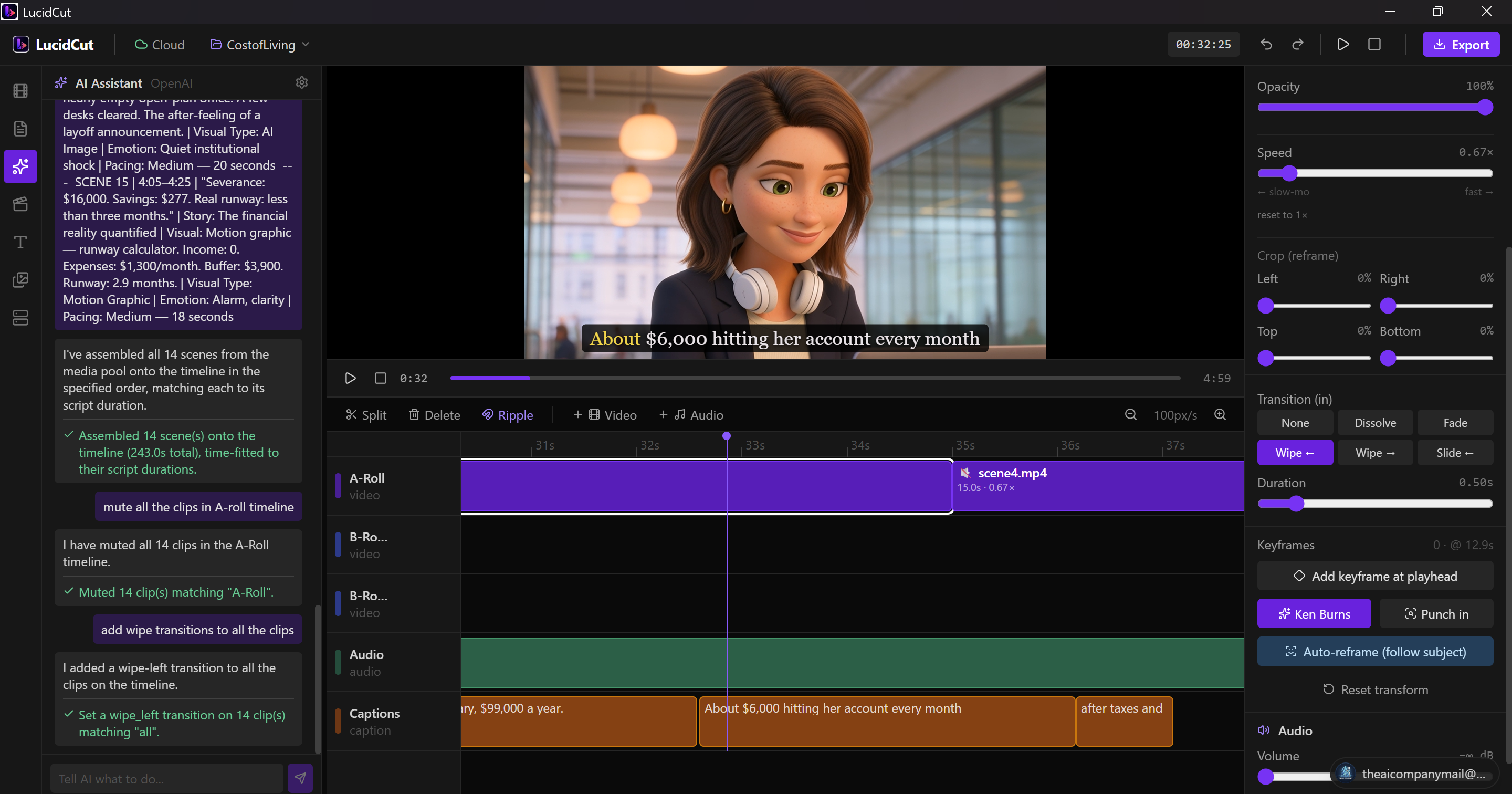
LucidCut turns raw footage into a finished cut with AI — transcript-based editing, auto karaoke captions, generative B-roll, and a chat agent that does the tedious work. Runs locally. Private. Fast.

✓ 100% local processing ✓ Whisper on-device ✓ No watermark ✓ Bring your own AI key

LucidCut editor
Whisper on-device·ffmpeg export engine· Claude · GPT · your key·Generative B-roll· Local & private·Cloud sync· Whisper on-device·ffmpeg export engine· Claude · GPT · your key·Generative B-roll· Local & private·Cloud sync·

Everything an editor hates,
done for you.

A full timeline editor with an AI brain bolted on. The precise tools when you want them, the assistant when you don't.

💬

Talk to your timeline

“Mute all the b-roll.” “Add a dissolve between every clip.” “Assemble these in scene order.” The AI agent runs real edits — undoable, precise, on your timeline.

“remove filler words from the intro”
“speed up scene 3 to fit 10 seconds”

Edit by transcript

Whisper transcribes your footage on-device. Delete a word, delete the video. Kill filler words in one click.

🅰️

Captions that pop

Auto-generated, word-synced karaoke captions with custom styles. Export burned-in, or as SRT / VTT.

Generative B-roll

Generate cinematic clips with Kling, Runway, or Sora — and auto-place them over the exact phrase you mention.

🎬

Assemble from script

Drop your clips and script. LucidCut orders them by scene and time-fits each shot by adjusting speed automatically.

🎚️

A real pro timeline

Ripple trim, transitions, keyframed transforms, subject-aware auto-reframe, multi-track audio mixing. Nothing dumbed down.

📤

Export, done right

A native ffmpeg pipeline renders animated transforms, transitions, overlays, captions and mixed audio — up to 4K.

☁️

Cloud sync

Your projects back up automatically and follow you across machines — while your media stays yours.

From footage to final cut
in three moves.

1

Import

Drag in your clips, voiceover and script. LucidCut transcribes and indexes everything automatically.

2

Direct

Tell the AI what you want, or fine-tune on the timeline yourself. Captions, B-roll, cuts, transitions — handled.

3

Export

Render a clean, watermark-free video up to 4K. Ship it to YouTube, Reels or Shorts.

See it in motion.

A 60-second look at editing a full video by talking to it.

One plan. No tiers.

Join the waitlist and lock in early-adopter pricing for good.

Waitlist price

LucidCut Pro

₹999 ₹499/month

Locked in for life if you join the waitlist now. Regular price at launch is ₹599/mo.

  • ✓ Full timeline editor — no watermark
  • ✓ AI editing, on-device transcription & captions
  • ✓ Generative B-roll & motion graphics
  • ✓ Cloud sync & cross-device projects
  • ✓ Priority updates & support
Join the waitlist — ₹499/mo

7-day free trial either way · cancel anytime · Razorpay (UPI / cards)

LAUNCHING SOON

Join the waitlist,
pay ₹499/mo. Forever.

Everyone else pays ₹599/mo at launch. Drop your email now and your rate stays ₹499/mo for as long as you're subscribed — no catch, no expiry.

No spam. One email when we launch.

Questions

Is my footage uploaded anywhere? +

No. Editing, transcription and export all run locally on your machine. Cloud sync (optional, Pro) stores your project file — your media stays on your device unless you choose otherwise.

Do I need an AI subscription? +

Yes — bring your own API key (Anthropic, OpenAI, or Azure). LucidCut sends your prompts directly to the provider using your key, so you pay their rate with no markup. The LucidCut subscription covers the editor itself, not AI credits.

What platforms are supported? +

LucidCut is a native Windows desktop app today. macOS is on the roadmap.

Is there a watermark on exports? +

Never. Exports are clean at every tier, up to 4K.

Make your next video
in half the time.

Free download for Windows. No account needed to try.

↓ Download for Windows v0.1 beta · 64-bit · ~220 MB

By downloading you agree to the Terms & Privacy Policy.